Everything to edit. No import needed.
Curves, masks, and color grading for the photos and videos already in Apple Photos. Try every tool free.


 4.8 - 119k+ Ratings
 Apple Design Award
 App Store Editors’ Choice
Magic Select Masks in Darkroom
Magic Select is a new Darkroom+ mask type that lets you tap, draw, or drag to select any object in a photo, with new edge tools to refine the result.
Read the post
iPhone Duo Support & Performance Upgrades
Darkroom is optimized for iPhone Duo on day one, for all poses. Plus 120fps editing on ProMotion displays, faster RAW rendering, 100MP RAW support, and better stability on older devices.
Read the postNon-destructive editing by design
Edit freely, and keep the original. Darkroom gives you non-destructive editing from the start, so nothing is locked in. Experiment with presets as springboards for new looks. Every adjustment is reversible, and every step is saved in your full edit history. Copy, paste, and refine across photos or videos without ever committing or damaging your originals. From first draft to final export, your work stays entirely under your control.
Photo and video in one flow
One workflow. Every medium. Darkroom brings photos and videos together in a single, fluid editing experience. Work with Portrait, RAW, ProRAW, slow motion, 4K, and even 8K video using the same set of tools, from color and curves to masks and presets. Adjust exposure, refine tones, and recover detail in real time, so editing motion feels as precise and immediate as editing stills.
Take every edit further with Darkroom+
AI masks, cinematic color, and analog glow — on photos and video. Try every tool free. Darkroom+ is only required when you export.

AI Masks
Select any object, a subject, or the sky, then shape light only where it belongs.
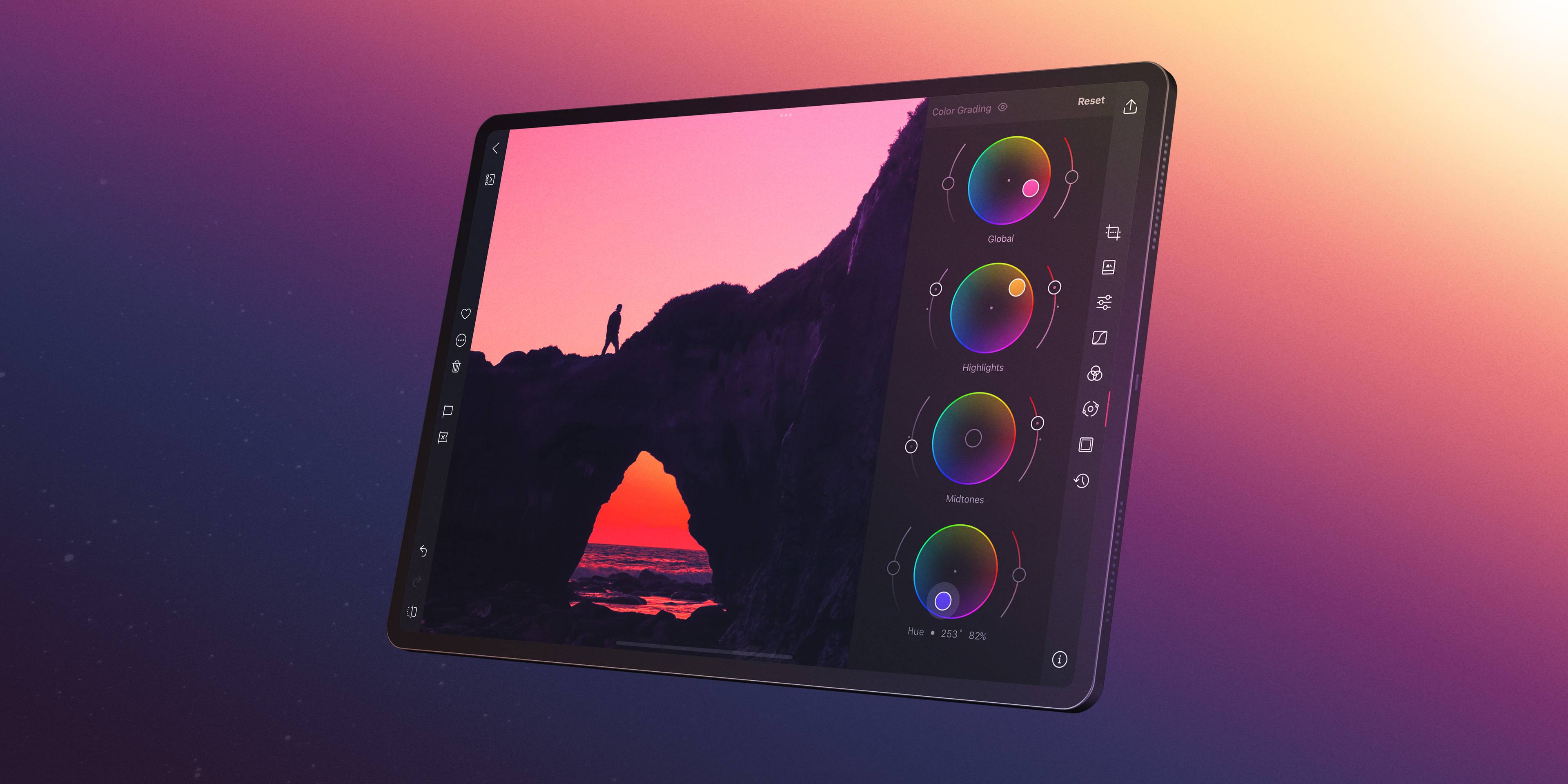
Color Grading
A different mood in shadows, midtones, and highlights — that's a look.

Curves
Sculpt tone and color by hand, even one RGB channel at a time.

Bloom & Halation
Vintage-lens glow and warm film halos on digital highlights.

Selective Color
Shift any hue without dragging the rest of the picture with it.

4K Video
The same tools as your stills. Grade, crop, and export 4K.
4,046 Free Community Presets
Free looks from photographers worldwide — skip the blank slate, start from a look you love, then refine it until it's unmistakably yours.




Press and App Store reviews
 AppleDesign Awards
Pros will appreciate Darkroom’s ability to batch-edit images, open RAW files, and create custom filters. In the crowded world of photo-editing apps, Darkroom shines bright.
 John GruberDaring Fireball
I can't say enough good things about Darkroom. It's fast, beautiful, powerful, and easy to understand and explore. And the team behind it keep improving the app on a regular basis.
 Leo LaporteYouTube
Desktop class without the desktop. I'm really impressed — I wanted a way to edit photos directly on the iPad and I think this is what it's going to be for me.
 The Verge
Darkroom is one of the best apps around, with support for RAW and ProRAW photos, along with the option to edit photos in batches.
 PetaPixel
Darkroom is one of the highest-rated photo apps available for iOS users, going well beyond VSCO with its editing capabilities and offers pro-level features in a very beginner-friendly layout.
 LifeWire
The first time you use Darkroom on your iPhone, iPad, or Mac, you’ll wonder why Apple didn’t make the Photos app this good.
 Josh GinterThe Sweet Setup
All of the iPhone-specific features built into the app make it the premier editing app for iPhone photographers.
 John VoorheesMacStories
The difference is that now the app can handle video editing as gracefully as it does photo editing.
 Alex HeathCult of Mac
I’ve been beta testing it for the past few weeks, and it’s the best photo editor I’ve used on the iPhone.
- Dream come trueApr 15, 2026 · Heineken snakes
After experiencing Darkroom, everything changed. Being able to edit directly from my camera roll, copy those edits, and batch apply them to multiple photos made the workflow simple, fast, and enjoyable again.
 Filipe Espósito9to5Mac
Darkroom is one of my favorite photo editors since it is available not only for iPhone but also for iPad and Mac.
- Color PlayFeb 26, 2026 · jimys
Love how the smallest adjustments can sometimes change everything. Isn’t that what art is anyway, a mistake that creates a different something brand new?
- The Sweet Setup
We think Darkroom still represents the best balance of power, ease-of-use, end product, and frequent updates.
 App StoreApp of the Day
With Darkroom, just a few taps can transform your photography.
 iMore
iMoreDarkroom has been my go-to editor for a few years now. The interface is smooth and intuitive, and it has all of the tools I would need.
- Great StarterJan 10, 2026 · Random2026
Darkroom has been a more than amazing starter tool for photo editing. I am honestly questioning if I should even go for the Lightroom subscription — or just stick with Darkroom.
- Tone Mapping Slider for ProRawJan 29, 2026 · Dee3
It was nice to be able to reduce the tone mapping and build the image back up with this very capable editor. Still giving you 5 stars with hope!
- Josh GinterThe Sweet Setup
But with each new release, Darkroom continues to push the bar for what can be done on iOS. In every way where Lightroom CC falls short on iOS, Darkroom picks up the pieces.
 David AddisonYouTube
It’s well worth its subscription fee — Bergen Co might have created the best photo editing app for iOS.
- The best photo editorNov 25, 2025 · Squirt Douglas
The grain simulation is wonderful and the fact it’s so native to iOS is a breath of fresh air. I can load RAW from my camera on my iPhone, jump into Darkroom, and edit on vacation without a laptop.
- John VoorheesMacStories
I’m glad I have the ability to edit in Darkroom on my iPhone, but the iPad is where the experience is best, which is why it’s great to have that option with the release of Darkroom 4.0.
- Great free OptionApr 10, 2026 · dUdE 7548
It is very thorough for being free and feels like one of the better apps to use for editing. It can be slightly confusing when first learning it, but it is a quick learn.
- 9to5Mac
Darkroom is streamlined for touching up photos and strikes a nice balance between powerful tools and usable features that makes it very approachable.
- Easy and powerfulAug 3, 2025 · ugaon30a
I recently moved to an iPad Pro and went looking for a go-to video editor. I’ve found it in Darkroom+ — and it’s my platform of choice for not only video, but also photos.
- Josh GinterThe Sweet Setup
Darkroom has always been the iPhone and iPad photo editor that floats powerfully under-the-radar.
- Great buy-it-once Lightroom replacementNov 28, 2025 · That guy9876
Love that you can do a subscription or just buy it outright. Took some getting used to coming from Lightroom, but it’s great on my iPad — very much worth it to be out of the Adobe stranglehold.
- Fantastic response timeNov 11, 2025 · Danny2Bikes
Filled out a bug report asking if there was a workaround. Got a response from one of the owners in under 24 hours with possible options to solve my problem. You can’t ask for better service than that.
 iPhoneblog.de
Sometimes I jump back a few years in my iCloud media library and edit three or four pictures at random. That doesn't happen to me with any other photo editing app.
Every tool to find a look.
Presets, grain, and frames to set a mood. RAW, crop, tone, and batch to finish the picture — all included.
Custom Presets — Save a look once — photos, video, and every device.
Grain — Film texture that scales — analog grain, not noise.
Color Frames — A frame from the photo itself, or a Stories crop in a tap.
Exposure and Tone — Recover highlights and shadows. Set black and white point.
Clarity — Sharpen texture or smooth skin, without a crunchy halo.
Crop and Perspective — Straighten, reframe, and fix geometry in one place.
RAW and ProRAW — True RAW from 600+ cameras, plus iPhone ProRAW.
Histogram — Catch exposure and color casts before they hit export.
Batch Editing — One edit you love, applied to the rest of the shoot.
Copy and Paste — Bring across only the adjustments you want.
Export — Photos, video, and presets, out to wherever you share.
iPhone, iPad, Mac, and Vision — Start on a phone, finish on a Mac. Same tools, no handoff.
Start Instantly — Open a photo and start shaping it — nothing to set up first.
Albums and Folders — Keep a shoot together and favorites close at hand.
Shortcuts — Crop, frame, and export without opening the editor.
Edit your iCloud Photos in Darkroom
Install the free app on iPhone, iPad, Mac, and Vision Pro. Open your iCloud Photos without a separate import.
Try it Free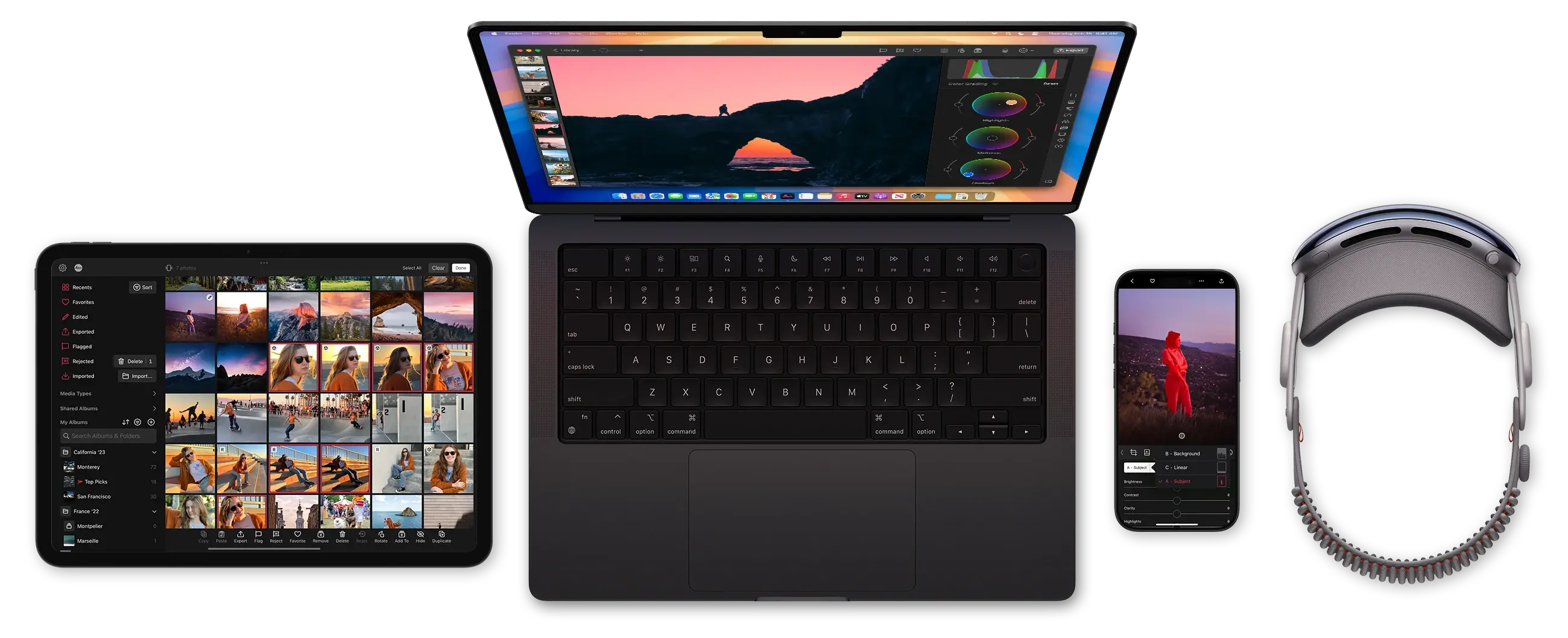
Receive the latest stories on new features, tips and tricks, right in your email inbox.