Darkroom+ Membership
Darkroom+ is Darkroom's premium membership. It unlocks the full set of advanced tools across iPhone, iPad, Mac, and Vision Pro, and because it's an App Store purchase, all billing — pricing, trials, renewals, and refunds — is handled by Apple through your account. This page walks through the questions people most often bring to support: what's included, what it costs, how trials and cancelation work, and how to restore or share a purchase.
What Darkroom+ unlocks
Darkroom is free to download and includes many free features. Darkroom+ adds unrestricted export access along with the full premium toolset:
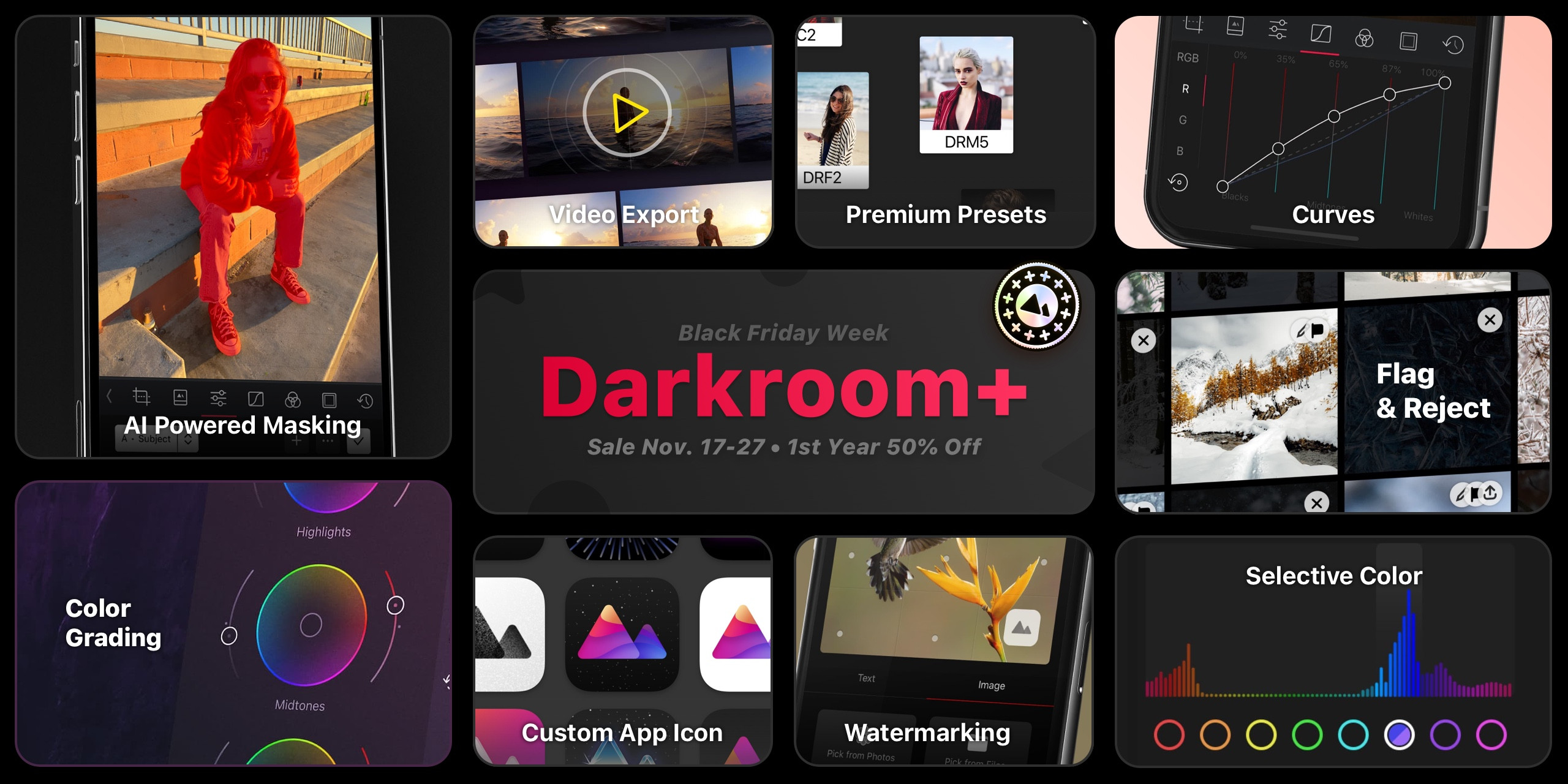
A useful quirk of Darkroom's model: you can open and fully experiment with every premium tool without a membership — a membership is only required for export. So you can build a complete edit with Color Grading, Masks, and Curves and see exactly what you'd get; Darkroom+ is what lets you save or share the result. It's a real try-before-you-buy, not a locked door.
- HSL Curves - 2026 - Adjust the hue, saturation, and lightness of your photos.
- Metadata Editor - 2026 - Edit image metadata like date, location, camera, and more.
- Bloom and Halation - 2025 - Add analog warmth and cinematic glow.
- Color Grading - 2022 - Adjust the color of your photos to match your style.
- Local Adjustments with AI backed Masks - 2022 - Enhance the lighting in an area of your photo.
- Flag & Reject - 2021 - Efficiently cull your ever-growing photo library.
- Video Export - 2020 - Grade and export your videos.
- Watermark - 2020 - Explicit online protection and clear attribution.
- Customize App Icon - 2020 - Have a little fun and customize your home screen.
- RGB Curves - 2015 - Achieve any look with just a few targeted swipes.
- Color - 2015 - Adjust the tone of individual colors.
- Premium Presets - 2015 - A collection of premium presets to help you get started.
Plans and pricing
Darkroom+ is usually offered three ways: a monthly subscription, a yearly subscription, and a Forever one-time purchase. Prices vary by country and currency, and we occasionally run localized pricing tests and seasonal campaigns, so the most accurate price for your account is always the one shown in-app or on our App Store page.
Those seasonal campaigns — Black Friday, for example — are announced in-app and on our social channels. You almost never need a promo code: if your account is eligible, the offer appears automatically, though some campaigns apply only to specific plans (yearly but not Forever, say). If an offer doesn't apply correctly, email feedback@darkroom.co with a screenshot of the offer screen.
Occasionally we run pricing tests to understand what people feel Darkroom is worth, so the number you see may differ from a friend's. If we ever make a structural pricing change that affects existing customers, we'll communicate it clearly — your current plan won't quietly change out from under you.
You can start a membership from any premium tool's paywall in-app, from Settings in Darkroom, or from the Darkroom+ overview page. If you'd rather buy once than subscribe, look for the Forever option and tap show all purchase options if it isn't visible.
Trials, billing, and cancelation
Some plans and regions include a free trial; availability varies with App Store rules. Try it Free on the website only opens the App Store — Darkroom doesn't run a separate checkout. Apple may ask you to authorize a payment method. If a trial is offered on your account, that starts the trial. If it isn't, the sheet is a purchase. You can close it and keep using every premium tool without paying. Flag & Reject, and Export are what require a membership.
You can cancel during a trial from your App Store subscription settings, but Apple may still charge if you cancel too close to renewal — so if you don't want it to renew, cancel at least 24 hours before the trial ends. Apple controls all plan changes and cancelations through Manage subscriptions; their cancel-a-subscription guide walks through it step by step.
To make that deadline easier to hit, Darkroom can remind you before a trial or membership expires — turn it on in the Membership settings and you'll get a nudge while there's still time to decide, instead of discovering the charge afterward.
There's no one-tap way to convert a subscription into the Forever purchase. To switch, cancel your active subscription, let it fully lapse, then buy the Forever option in Darkroom.
Managing your membership in the app
The Membership pane in Settings is the place to check where you stand, on every platform — iPhone, iPad, Mac, and Vision Pro. Beyond showing your current plan, it handles the situations that would otherwise mean a trip to the App Store or an email to us:
- Switch from Monthly to Yearly directly, without canceling and repurchasing.
- Resolve a billing issue. If Apple can't process a renewal — an expired card is the usual reason — Darkroom shows a Billing Issues state with an action that takes you straight to the fix. Your access continues during Apple's retry window, so acting on this promptly is what prevents an interruption.
- See when a membership is shared with you. If your access comes through Family Sharing, the pane says so with a Family Shared state rather than leaving you guessing why there's no subscription on your own account. Manage or cancel that one from the purchaser's Apple ID.
Apple remains the merchant of record throughout, so cancelations and refunds still go through your App Store account.
What happens if you cancel or lapse
Canceling doesn't put your work at risk. Darkroom edits non-destructively, so your original photos are never altered, and that doesn't change with your membership status. The edits you've made and the presets you've created stay exactly where they are — nothing is deleted when a membership ends.
What changes is going forward: once Darkroom+ lapses, the premium tools return to try-before-you-buy mode, and you'll need an active membership again to export photos or videos that use premium edits. Your existing exported files are yours to keep regardless. Resubscribe at any time and everything picks up right where you left off — same edits, same presets, full export access restored.
Using Darkroom+ across your devices
Your purchase works on every Apple device signed in with the same Apple ID that bought it, and in most cases access syncs automatically via iCloud Keychain. If it doesn't appear, open Darkroom Settings, tap Already made a purchase?, and wait for the restore to finish. If a restore still fails, confirm you're on the right Apple ID, sign out and back into the App Store, make sure Darkroom is up to date, and check Apple System Status for any ongoing outage.
A few specific situations trip people up:
- "I paid but don't have access." Almost always this means you're signed into a different Apple ID than the one that made the purchase. Membership is tied to the Apple ID, not to a Darkroom account (there isn't one), so check Settings → [your name] → Media & Purchases on the device and confirm it matches the account you bought with.
- "You're currently subscribed to this." This message means the purchase went through on your Apple ID but Darkroom hasn't picked it up yet. Tap Already made a purchase? in Darkroom Settings to restore it onto the device.
- The restore spins and never finishes. Force-quit and reopen Darkroom, confirm you have a working connection, and try once more; if it still hangs, an Apple-side outage on System Status is the usual culprit.
If none of that resolves it, email feedback@darkroom.co and we'll help track it down.
Darkroom+ also supports App Store Family Sharing. Make sure Purchase Sharing is enabled and each family member is signed into the expected Apple account. Note that Apple may limit sharing of some one-time purchase types (like Forever or legacy) by device count, while subscription-based sharing generally has fewer restrictions.
Refunds
Apple is the payment processor and merchant of record for all iOS in-app purchases, which means we can help with guidance and troubleshooting, but refund approvals and payment reversals are decided by Apple. Start a request through Apple's refund flow. If you were billed unexpectedly, it's worth first checking your trial end date and renewal timing in your Apple subscription settings to see whether cancelation landed within Apple's 24-hour window.
Frequently Asked Questions
Can I use my Darkroom+ membership across my Apple devices?
Yes. Your Darkroom+ access works on your iPhone, iPad, Mac, and Vision Pro when you use the same App Store account that made the purchase.
If access does not appear automatically, open Settings in Darkroom and tap Already made a purchase? to restore.
What does a Darkroom+ membership cost?
Pricing varies by country, currency, and occasional campaigns. In the United States, plans are typically monthly, yearly, and forever one-time purchase. For exact current pricing, check the in-app paywall or our App Store page.
Can I try Darkroom+ before paying?
Yes. Every premium tool can be used without a membership — export and Flag & Reject are what requires Darkroom+. Try it Free on the website opens the App Store, where Apple may ask you to authorize a payment method. If a trial is offered on your account, that starts the trial. If it isn't, the sheet is a purchase. You can close it and keep editing; a membership is only required to export or use Flag & Reject.
How do I cancel a Darkroom+ subscription or trial?
Manage or cancel directly in your App Store account: Manage subscriptions. You can also use Apple's guide: Cancel a subscription on iPhone.
Do I keep my edits and presets if I cancel?
Yes. Your original photos are never altered, and your edits and saved presets stay exactly where they are when a membership ends. You'll just need an active membership again to export photos or videos that use premium edits. Resubscribe any time and everything picks up where you left off.
Can I get a refund?
Apple handles all billing and refunds for App Store purchases. Use Apple's refund flow: Request a refund.
Does Family Sharing work with Darkroom+?
Yes, Family Sharing is enabled. Make sure Purchase Sharing is turned on in Family Sharing settings. Note that Apple may apply device-sharing limits for some one-time in-app purchases.
Can I switch from Monthly to Yearly?
Yes, in one step. Open the Membership pane in Settings and switch from Monthly to Yearly there — you don't need to cancel and repurchase. Switching a subscription to the Forever purchase is different: cancel the subscription, let it fully lapse, then buy Forever in Darkroom.
Can I switch from subscription to Forever?
Yes, but not instantly. Cancel your current subscription first, let it fully lapse, then purchase the Forever plan in Darkroom. Switching from Monthly to Yearly is a separate, one-step action in Membership settings — you don't cancel for that.
I can't find the one-time purchase.
Open the paywall from a premium tool, or from the Membership pane in Settings, and look for Forever. Tap show all purchase options if you only see monthly and yearly. The website doesn't sell it separately — the purchase always goes through the App Store.
What is a legacy purchase?
Legacy purchases were one-time purchases sold before February 2020. They are no longer available. See Legacy Membership for details.
Related
- Settings — Membership pane, restore, and billing states
- Legacy Purchases — what a pre-2020 purchase still unlocks
- Report an Issue — when a restore or billing problem needs a look